
Get your strings shuffled and randomized with ease!
Learn how to randomize a string in Python, including code samples and practical examples.
Author: Jeremy Morgan
Published: December 14, 2023
AI changed software development. This is how the pros use it.
Written for working developers, Coding with AI goes beyond hype to show how AI fits into real production workflows. Learn how to integrate AI into Python projects, avoid hallucinations, refactor safely, generate tests and docs, and reclaim hours of development time—using techniques tested in real-world projects.
In Python, there are several ways to randomize a string. You can use the random module or the string module. In this article, we’ll explore both methods and provide you with some practical examples of how to use them.
The Random Module
The random module is a built-in Python module that provides functions for generating random numbers. You can use it to randomize a string by converting the string into a list of characters, shuffling the list, and then joining the characters back together into a string. Here’s an example:
import random

my_string = "hello world"

# Convert the string into a list of characters
char_list = list(my_string)

# Shuffle the list using the random.shuffle() function
random.shuffle(char_list)

# Join the shuffled characters back together into a string
randomized_string = "".join(char_list)

print(randomized_string)
Here is the output:

This code will output a randomized version of the my_string variable. You can run it multiple times to see different results, as the shuffle function generates a new random order for the characters each time it’s called.
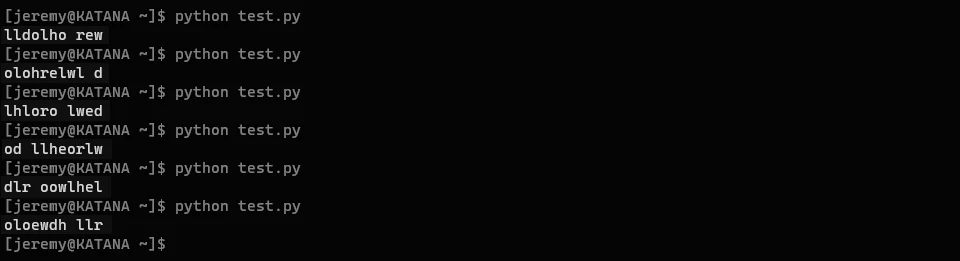
It even randomizes the location of the space.
Practical Examples
Now that we’ve covered how to randomize a string, let’s take a look at some practical examples of when you might want to use this technique.
1. Generating a Random Password
You can use the random module to generate a random password. Here’s an example using the random module:
import string
import random

# Generate a random password with 8 characters
password = "".join(random.choices(string.ascii_letters + string.digits, k=8))

print("Your new password is:", password)
here is the output:

This code will generate a random password with 8 characters, using both letters and digits. You can adjust the number of characters by changing the k parameter in the random.choices() function.

Conclusion
In this article, we’ve covered how to randomize a string in Python, including code samples and practical examples. We’ve seen how to use both the random module and the string module to achieve this. Whether you’re generating a password, username, or URL, randomizing a string can be a useful technique to keep your data fresh and secure.
AI changed software development. This is how the pros use it.
Written for working developers, Coding with AI goes beyond hype to show how AI fits into real production workflows. Learn how to integrate AI into Python projects, avoid hallucinations, refactor safely, generate tests and docs, and reclaim hours of development time—using techniques tested in real-world projects.